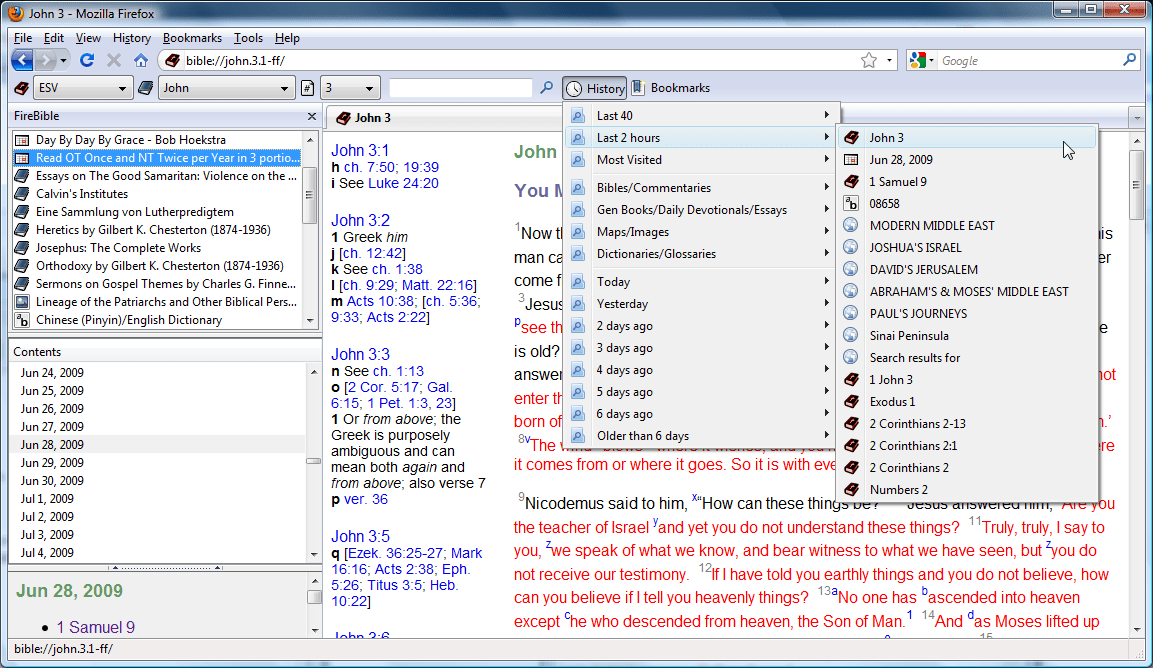
As usual, this has been sitting complete but unpolished on my machine for a few months now and I haven’t had any time to finish it the way I wanted. I have mostly finished with History and Bookmark support, so this is a sneak peak into what is coming in FireBible 0.9. The primary issue that I was grappling with was whether Dictionary / Glossary lookups should make it to one of the primary history lists. I decided that they shouldn’t and moved on to thinking about how all history / bookmark entries could be segregated by type. There are many different types of SWORD modules, but for the purpose of history and bookmark listings, I have divided them into the following four categories:
Bibles/Commentaries/Questionable
General Books/Daily Devotionals/Essays/Other
Maps/Images
Dictionaries/Glossaries
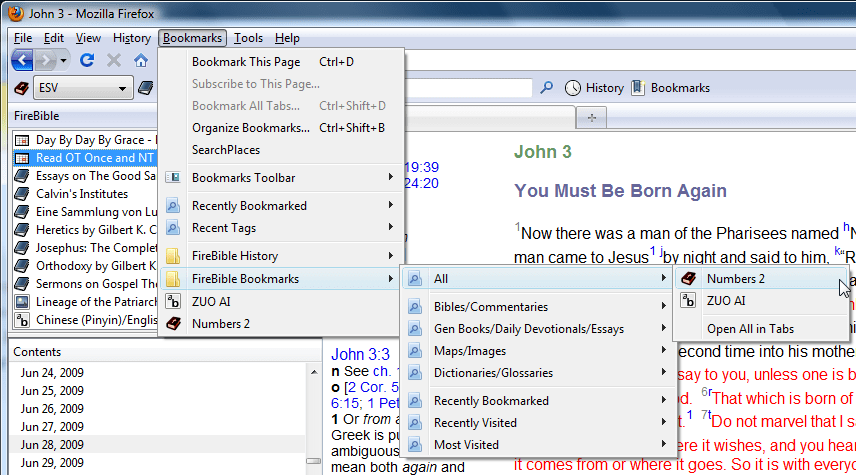
FireBible annotates the URLs when you visit them, placing them in one of the four categories above. Then using a simple places query, I can list them out in any way I want. What you see in the screenshot is just a number of queries I think will be useful. Besides the FireBible toolbar, they are also available in the Bookmarks menu where they can be modified and queries can be added or deleted.
Of course, FireBible has always had history, bookmark and tagging support since the beginning. Anything you read is recorded in Firefox’s regular history and locations can be bookmarked just like regular HTTP URLs. FireBible 0.9 simply adds annotations to these URLs so they can be correctly categorized and presents them in a central location, without being “disturbed” by your regular browsing history. Because the annotations will only be added for content you read after installing FireBible 0.9, the categorization might seem off for a bit, but it will settle down with use. I plan to make FireBible 0.9 available around the time Firefox 3.5 is available. FireBible 0.9 will only work on Firefox 3 and above, Firefox 2 support has been dropped, primarily because of the places queries and some cool new features yet to arrive. Stay tuned!
In the meanwhile, if you have any suggestions or critique, do send them along or leave a comment.
I spent this afternoon getting DataFox 1.7.5 ready for release; this version is a minor update, fixing changes in the http://data.bsnl.in portal which rendered version 1.7 defunct. I also used the opportunity to correct the max version, so DataFox will now work with the all Firefox 3.5 installations. Enjoy!
I’ve been the lead developer for MyEclipse web service developer tools for almost two years now. Until recently we had concentrated all of our energy on the heavyweight SOAP web service technology stack. Yet, the lightweight REST web service movement was something we had been researching and planning to support. The question was when would we add that support for MyEclipse….
MyEclipse 6.5
At my EclipseWorld presentation, I gave a talk on web services. To elicit the audience’s interest in REST, I demonstrated ad hoc REST development using MyEclipse 6.5. Now MyEclipse 6.5 web service tools did not explicitly support REST, so I improvised for my demo. With a few hours of trial and error web project setup and configuration I was able to create a helloworld REST web service project that I could deploy and test. I mention this ME 6.5 experiment with REST web services and the troublesome and time consuming process as a contrast to the convenience of the new MyEclipse 7.0 REST web service features.
MyEclipse 7.0
MyEclipse 7.0 introduced REST developer tools that make REST web service development drop-dead simple with no configuration complexity, Maven or otherwise; create a REST web services project in a few clicks. Jersey 1.0 libraries and dependent JARs are split among a few MyEclipse containers to help you choose exactly what you need for your application. If you want to manage your dependencies with Maven, that’s possible too, all you have to do is check a box, MyEclipse will deal with your pom.xml dependencies for you.
New REST Project WizardNew REST Project - Library Selection
To create a web service, select a class (or create a new one), specify the path, add a few methods and you’re done.
REST Class Wizard
The method wizard can be invoked from the above class wizard to add new methods or directly from the Java editor to add methods to a class you are currently editing.
REST Method Wizard
If you’re a MyEclipse PRO subscriber, you can use the REST Web Services Explorer to test your web service from within the IDE.
REST Web Services Explorer
For all their coolness though, the wizards in MyEclipse 7.0 had no editing support. You could use them to add a new class or add methods, but you could not use them to edit existing classes or methods. This left you hanging when it came to modifying existing service annotations. REST with JAX-RS is annotation heavy, and a complex method could have at least 10 annotations and you certainly wouldn’t want to be editing those by hand if you could avoid it.
MyEclipse 7.1
In MyEclipse 7.1, I worked in the editing support for both the method and the class wizards. You can bring up the editor from the context menu in the Java editor, Outline view, Package explorer, etc. Just select (or place your cursor in) the method or class you want to edit and bring up the context menu to invoke the wizard.
Editor Context MenuOutline Context Menu
The wizard will open pre-populated with all the REST annotations filled into it’s fields. You can now add, edit or delete annotations. You can even add and remove parameters from methods. When you hit finish, only the changes you made are written back to the editor, you don’t have to worry about losing any other (non REST) changes you may have made manually.
Edit REST Class Wizard
One of my favorite things about these wizards is the ability to invoke them while typing using Ctrl + 3. So if you’re in the middle of editing your code and you want to bring up the wizard, press Ctrl + 3, type in “edit rest” and choose the wizard you want. Much faster than moving your hand over to the mouse and selecting from the context menu, I say.
Edit REST - Ctrl + 3
In 7.1, we also moved on to Jersey 1.0.2, which brings in a new MIME and Multipart API and a large number of fixes and enhancements. The REST Web Services Explorer will now display JSON output in the Raw View, you no longer need to save it as a file and then open externally.
Onwards…
The intuitiveness of the REST tools are all about making REST development a no-brainer hassle-free experience. The Eclipse World demo I discussed at the beginning of this post took me under five minutes to finish with our REST tools. Now you’re probably thinking, “But isn’t REST supposed to be easy? Why do I need tools for a process that is easy?”. True, but only once you know all the principles behind the process and have gone through the initial error prone setup; hopefully not having quit due to sheer frustration! Even after you know what is involved, execution is still a manual process for most part and will still take time, no matter how much you know. Why spend hours pottering with your dev environment, research and syntax when you can just use MyEclipse? Spend the time working on a bad-ass service for your customers instead and let us do the heavy lifting for you.
We have plenty of ideas for future REST features; Spring integration, JPA integration, WADL support for top down service / client generation, … how about you tell us? We’re listening.
I finally had some time to polish off version 1.7 of DataFox, something which had been quite ready for a few weeks, but hadn’t been tested yet. Special thanks to Apoorv for testing the Delhi code as well as surfacing some important OS X bugs. Props to Vrushank Desai for the MTNL credentials I needed.
New in version 1.7:
Support for data.bsnl.in (bbservice.bsnl.in still works as well for 117.* series users).
Support for MTNL Bombay users with ‘@’ usernames.
New {rX} variable contains the remaining amount of transfer for the current month.
Will be pushed to AMO (still has version 1.5) later this week, the review process usually takes awhile. Enjoy!
An old magazine from 1977, 4 years before I was born. Found in my grandparent’s house; thought you guys may find it interesting, especially Anand’s secret 🙂
 As usual, this has been sitting complete but unpolished on my machine for a few months now and I haven’t had any time to finish it the way I wanted. I have mostly finished with History and Bookmark support, so this is a sneak peak into what is coming in FireBible 0.9. The primary issue that I was grappling with was whether Dictionary / Glossary lookups should make it to one of the primary history lists. I decided that they shouldn’t and moved on to thinking about how all history / bookmark entries could be segregated by type. There are many different types of SWORD modules, but for the purpose of history and bookmark listings, I have divided them into the following four categories:
 FireBible annotates the URLs when you visit them, placing them in one of the four categories above. Then using a simple places query, I can list them out in any way I want. What you see in the screenshot is just a number of queries I think will be useful. Besides the FireBible toolbar, they are also available in the Bookmarks menu where they can be modified and queries can be added or deleted.


